
Key Takeaways
- Most quality standing desks with drawers support 150-220 pounds on the desktop surface, while individual drawer units typically handle 15-30 pounds each.
- You do not need to unload drawers when adjusting desk height, as quality models are designed with loaded drawer weight included in the total capacity.
- Beginners should start by standing for 15-20 minutes every hour, then increase to 30 minutes of standing per hour after two weeks of adaptation.
- Exceeding the manufacturer’s weight limits can damage the lifting mechanism and void your warranty, so heavy items should be distributed evenly across the surface.
- Heavier items should be placed in lower drawers for better stability, and the combined weight of desktop items and drawer contents must stay within the desk’s total rated capacity.
Expert Reviewed
Updated Regularly
A standing desk with drawers combines ergonomic benefits with essential storage space. Whether you work from home or need better office organization, this guide will help you select the right model and set it up correctly. You’ll learn how to assess your space, choose features that match your needs, and assemble your desk efficiently. By the end, you’ll have a functional workspace that supports your health and keeps everything within reach.
Table of Contents
Quick Answer
Setting up a standing desk with drawers involves measuring your space, selecting a desk with adequate storage and height range, assembling the frame and drawers according to instructions, and adjusting the height to match your elbow level when standing. Most setups take 1-2 hours and require basic tools like an Allen wrench and screwdriver.
Looking for more options? Check out our comprehensive standing desks guide for the full roundup.

What You’ll Need
- Tape measure or laser measuring tool
- Phillips head screwdriver
- Allen wrench set (often included with desk)
- Level tool or smartphone level app
- Power drill with bits (optional, speeds assembly)
- Second person to help lift (recommended)
- Clear floor space for assembly
Step-by-Step Instructions for Your Standing Desk with Drawers
Step 1: Measure Your Workspace
Start by measuring the area where you’ll place your desk. Use a tape measure to record the width, depth, and any obstacles like windows or outlets. Write down these measurements and add 6 inches of clearance on each side.
Check the ceiling height if you have overhead shelves or cabinets. Your standing desk with drawers needs room to rise to full height. Most electric models extend between 28 and 50 inches.
Measure the distance from the floor to your elbow when standing. This helps you pick a desk with the right height range. Your elbows should bend at 90 degrees when typing.
Pro tip: Take photos of your space from multiple angles. This helps when shopping online to visualize how different desk sizes will fit.
Step 2: Choose the Right Desk Features
Consider how many drawers you need based on your storage requirements. A standing desk with drawers typically offers 2-4 drawer options. Count your office supplies, cables, and documents that need storage.
Decide between electric and manual height adjustment. Electric models cost more but adjust smoothly with a button press. Manual cranks save money but require more effort.
Check the weight capacity, especially if you use multiple monitors. Quality desks support 150-300 pounds. Add up your equipment weight before buying.
Look for programmable memory presets if choosing electric. This feature saves your preferred heights for sitting and standing positions.
Pro tip: Prioritize desks with drawers on lockable casters if you rearrange your space frequently. This adds flexibility without sacrificing storage.

Step 3: Unbox and Inventory All Parts
Clear a large floor area, at least 6 feet by 4 feet. Carefully remove all components from the box and lay them out. Don’t discard the packaging until assembly is complete.
Locate the instruction manual and parts list. Check off each item as you find it. Most standing desk with drawers packages include the desktop, frame pieces, drawer units, legs, and hardware bags.
Separate screws, bolts, and washers by type. Use small containers or the plastic bags they came in. This prevents mixing up similar-looking fasteners.
Inspect each piece for shipping damage. Look for dents, scratches, or cracks. Contact the manufacturer immediately if you find damage.
Pro tip: Take a photo of all laid-out parts before starting. If something goes missing during assembly, you’ll have a reference.
Step 4: Assemble the Frame and Legs
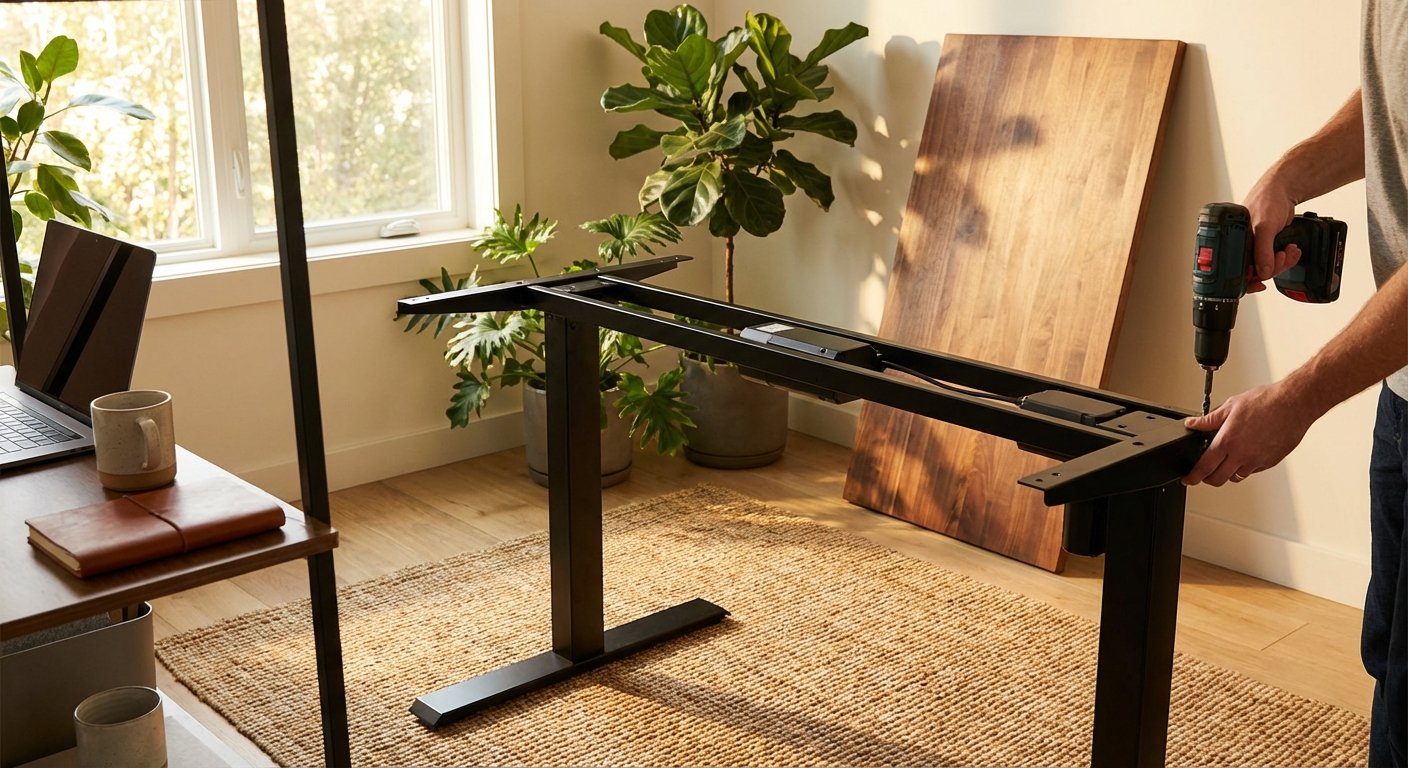
Start with the frame on the floor, upside down. Attach the leg supports to the main crossbeam using the provided bolts. Hand-tighten first, then use your Allen wrench.
Connect the motor unit if you have an electric model. Follow the color-coded wiring diagram in your manual. The cables typically snap together with connector plugs.
Attach each leg to the leg supports. Make sure they’re oriented correctly before tightening. The leg brackets should face inward toward each other.
Double-check that all bolts are secure but don’t overtighten. This can strip threads or crack plastic components.
Pro tip: Keep all screws slightly loose until the entire frame is together. This allows adjustments if pieces don’t align perfectly at first.
Step 5: Install the Drawer Units
Attach the drawer cabinet to the underside of your desktop. Most standing desk with drawers models use pre-drilled holes for mounting brackets. Align the brackets with these holes.
Secure the drawer unit using the screws provided. Start with corner screws first to ensure proper alignment. Then fill in the remaining mounting points.
Test each drawer by sliding it in and out. They should move smoothly without sticking. If a drawer binds, loosen the mounting screws and adjust the cabinet position.
Install drawer pulls or handles if they came separate. These typically screw in from inside the drawer front.
Pro tip: Place a folded towel under the desktop while attaching drawers. This protects the finish from scratches on hard floors.
Step 6: Attach the Desktop
With help from another person, carefully flip the desktop upside down. Place it on a soft surface like carpet or moving blankets. Position the assembled frame on top of it.
Center the frame on the desktop, leaving equal overhang on all sides. Most desks look best with 2-3 inches of overhang at the front and back.
Mark the mounting holes with a pencil through the frame brackets. Remove the frame and drill pilot holes if working with solid wood. Our lift desk review covers the specs and real-world performance in detail.
Reposition the frame and secure it with the desktop mounting screws. Tighten in a diagonal pattern to distribute pressure evenly.
Pro tip: Use your level tool across the desktop before final tightening. A level surface prevents items from rolling off later.
Step 7: Flip and Position the Desk
With your helper, carefully flip the entire desk right-side up. Bend your knees and lift with your legs, not your back. Move slowly to avoid damaging components.
Position the standing desk with drawers in your designated workspace. Leave at least 3 inches between the back of the desk and the wall for cable management.
Check that the desk sits level using your level tool. If it rocks, adjust the leg levelers on the bottom of each leg. Most models have these built in. We also tested several alternatives in our rising desk roundup.
Plug in the power cord if you have an electric model. The control panel should light up when connected.
Pro tip: Place furniture pads under each leg before positioning. This protects your flooring and makes future moves easier. For hands-on impressions, read our ikea standing desk breakdown.

Step 8: Program Your Height Settings
Stand in front of your desk with your arms at your sides. Raise the desk until the surface reaches your elbow height. Your forearms should be parallel to the floor. Looking for more options? Check out our electric desk buying guide.
Save this height as preset 1 on your control panel. Press and hold the memory button according to your manual’s instructions.
Sit in your chair at the proper height. Adjust the desk down until it’s at elbow level while seated. Save this as preset 2.
Test both presets by switching between them. The desk should move smoothly without wobbling or making grinding noises.
Pro tip: Add a third preset at a higher position for tasks like reading or casual laptop browsing. This variety keeps you moving throughout the day. You might also find our best standing desk comparison helpful when narrowing down your choices.
Step 9: Organize and Load Your Drawers
Plan your drawer organization before loading items. Keep frequently used supplies in the top drawer. Store reference materials and backup supplies in lower drawers.
Use drawer dividers or small containers to separate different items. This prevents clutter and makes everything easy to find. Office supply stores offer adjustable divider systems.
Distribute weight evenly across all drawers. Don’t overload the top drawer while leaving others empty. This affects the desk’s stability, especially when raised. Looking for more options? Check out our sit stand desk buying guide.
Label drawer contents if you store similar items in multiple drawers. This saves time searching later. We cover the full lineup in our height adjustable desk feature.
Pro tip: Keep your standing desk with drawers organized by doing a 5-minute cleanup at the end of each workday. This habit prevents clutter buildup.
Pro Tips for Standing Desk with Drawers Success
Start with short standing intervals: Begin with 15-20 minute standing sessions every hour. Your body needs time to adapt to this new work style. Gradually increase to 30-45 minutes as you build stamina.
Use an anti-fatigue mat: Place a cushioned mat where you stand. This reduces pressure on your feet, legs, and back. Look for mats at least 3/4 inch thick with beveled edges.
Manage cables properly: Use cable trays or clips under the desktop. This prevents tangled wires and keeps them safe during height adjustments. Zip ties work well for bundling excess cable length.
Maintain your desk quarterly: Check all bolts and screws every three months. Tighten any that have loosened from regular movement. Wipe down the frame and drawers to prevent dust buildup in the mechanisms.
Position monitors correctly: Your screen’s top should be at or slightly below eye level when standing. Use monitor arms that adjust with your desk height for optimal ergonomics. Looking for more options? Check out our height adjustable desk buying guide.
Troubleshooting Common Issues
Problem: Desk Wobbles When Raised
Solution: First check that all leg levelers touch the floor evenly. Adjust each one until the desk feels stable. If wobbling persists, tighten all frame bolts using your Allen wrench. Loose connections cause most stability issues. Also verify your floor is level using a level tool.
Problem: Drawers Stick or Won’t Close Smoothly
Solution: Remove the drawer completely and check the slides for obstructions. Wipe the drawer slides with a dry cloth to remove dust. Apply a small amount of silicone lubricant to metal slides. If drawers still stick, loosen the mounting screws slightly and adjust the cabinet position.
Problem: Electric Motor Makes Noise or Moves Slowly
Solution: Unplug the desk and check all cable connections between the motor and control box. Reconnect any loose plugs firmly. Remove items from the desktop to reduce weight below the maximum capacity. If noise continues, contact the manufacturer as the motor may need service. If you’re comparing options, our updesk guide breaks down the key differences.
Problem: Height Presets Don’t Save Properly
Solution: Reset the control panel by unplugging the desk for 30 seconds. Plug it back in and follow the manual’s reset procedure. Most models require holding specific buttons during startup. Reprogram your heights after the reset. If presets still fail, the control panel may need replacement under warranty. For a deeper dive, see our guide on height adjustable desk. For a deeper dive, see our guide on lift desk. For a deeper dive, see our guide on stand up desk. For a deeper dive, see our guide on updesk. Before you decide, it’s worth reading our sit stand desk deep dive.
Frequently Asked Questions About Standing Desk with Drawers
How much weight can a standing desk with drawers typically hold?
Most quality models support 150-220 pounds on the desktop surface. This includes monitors, laptops, desk accessories, and other equipment. The drawer units usually handle 15-30 pounds per drawer. Always check your specific model’s weight rating in the manual. Exceeding weight limits can damage the lifting mechanism and void your warranty. Distribute heavy items evenly across the surface rather than clustering them in one spot.
Do I need to unload drawers when adjusting height?
No, you don’t need to empty drawers for normal height changes. Quality standing desk with drawers models are designed with loaded drawers included in the weight capacity. However, avoid overloading drawers beyond their individual limits. The combined weight of desktop items and drawer contents should stay within the total capacity. Keep heavier items in lower drawers for better stability.
How often should I alternate between sitting and standing?
Start by standing for 15-20 minutes every hour in 2026. This ratio helps beginners adapt without fatigue. After two weeks, increase to 30 minutes of standing per hour. The ideal pattern varies by person. Listen to your body and adjust as needed. Movement matters more than exact timing. Some people prefer 45 minutes sitting, then 15 minutes standing. Others do 30-30 splits throughout the day.
Can I add more drawers to my standing desk later?
This depends on your desk’s design. Some standing desk with drawers models have modular systems that accept add-on storage. Check with your manufacturer about compatible accessories. Many brands offer rolling drawer pedestals that sit beside the desk. These don’t attach to the frame but provide extra storage. Mobile pedestals work well because they don’t add weight to the lifting mechanism.
What’s the average lifespan of an electric standing desk?
Quality electric standing desk with drawers units last 5-10 years with proper maintenance. The motors typically handle 10,000-20,000 height cycles. If you adjust twice daily, that’s over 13 years of use. Manual desks last even longer since they have fewer mechanical parts. Regular maintenance like tightening bolts and cleaning slides extends lifespan. Most manufacturers offer 3-5 year warranties on frames and motors.
Will a standing desk help with back pain?
Standing desks can reduce back pain for many users, but they’re not a cure-all. The key is movement and posture variety throughout the day. Standing in one position too long causes different problems than sitting too long. Use your standing desk with drawers to alternate positions regularly. Combine it with proper monitor height, keyboard position, and an anti-fatigue mat. Consult a doctor about persistent back pain rather than relying solely on furniture changes.
How difficult is assembly for one person?
Most people can assemble a standing desk with drawers alone, but it takes longer. The main challenge is flipping the assembled desk right-side up. This step really benefits from a helper for safety. If working solo, use proper lifting technique and take your time. Some manufacturers offer assembly services for an extra fee. Assembly typically takes 1-2 hours for two people, or 2-3 hours working alone. Basic tool skills are sufficient for most models.
Final Thoughts on Your Standing Desk with Drawers
Setting up your new workspace properly ensures years of comfortable, productive use. Take time during assembly to double-check connections and alignment. Your investment in a standing desk with drawers pays off through better health and organization.
Remember that adjustment takes time. Your body needs several weeks to build standing stamina. Start slowly and increase duration gradually. Track how you feel and modify your routine accordingly.
Keep your workspace organized by using those drawers effectively. A clutter-free desk surface and easily accessible supplies make your workday smoother. With proper setup and good habits, you’ll enjoy your new desk for years to come.